Refurbished Dell Inspiron 15 3511 Review: Core i5 11th Gen, 8GB RAM, 256GB SSD
If you want a big-screen Windows laptop with a modern processor but do not want to spend the price of a new one, the refurbished Dell Inspiron 15 3511 deserves a close look. It pairs an 11th Gen Intel Core i5 with a 15.6-inch Full HD display, a full-size keyboard with a number pad, and the ports most Indian students and offices still need every day.
In this detailed guide, the amrkart team explains everything you should know before buying the Dell Inspiron 15 3511 refurbished: real-world performance, display quality, battery life, upgrade options, who it suits (and who it does not), how it compares with other laptops at the same price, and what to check before you pay.
Dell Inspiron 15 3511 specifications at a glance
| Feature | Specification (amrkart refurbished unit) |
|---|---|
| Processor | Intel Core i5-1135G7 (11th Gen), 4 cores, 8 threads, up to 4.2 GHz, 8MB cache |
| Graphics | Intel Iris Xe (with dual-channel memory) / Intel UHD Graphics (single-channel) |
| RAM | 8GB DDR4, two slots, upgradeable to 16GB |
| Storage | 256GB SSD, upgradeable to 512GB or 1TB |
| Display | 15.6-inch Full HD (1920 × 1080), anti-glare, narrow border |
| Ports | HDMI, USB Type-A ports, SD card reader, headphone/mic jack (Ethernet on many units) |
| Wireless | Wi-Fi 5 (802.11ac), Bluetooth 5.0 |
| Webcam | 720p HD |
| Keyboard | Full-size with numeric keypad |
| Battery | 3-cell, 41Wh |
| Weight | About 1.7–1.8 kg |
| Operating system | Windows 11 Home |
| Condition | Grade A certified refurbished |
| Warranty | 12-month amrkart warranty |
Exact ports, keyboard backlight and graphics can vary slightly between original Dell configurations. Check the product page or ask us on WhatsApp for the exact unit you are buying.
Who is the Dell Inspiron 15 3511 for?
The Inspiron 3000 series was designed by Dell as a dependable everyday laptop for homes, students and small offices. As a refurbished laptop, it now costs far less than its original price, which makes it an excellent fit for:
- College and school students who need a large screen for notes, assignments, online classes and exam preparation.
- Working professionals who spend the day in Excel, Word, Google Sheets, email and video calls.
- Shop owners, accountants and CA offices running Tally Prime, Busy, GST billing software and spreadsheets – the number pad is a real advantage here.
- Beginner programmers learning Python, Java, web development or data basics.
- Families who want one reliable laptop for homework, movies, browsing and work from home.
It is not the right choice if you need a very light laptop to carry all day, if you edit 4K video professionally, or if you want to play the latest AAA games. We cover better options for those needs later in this guide.
Design and build quality
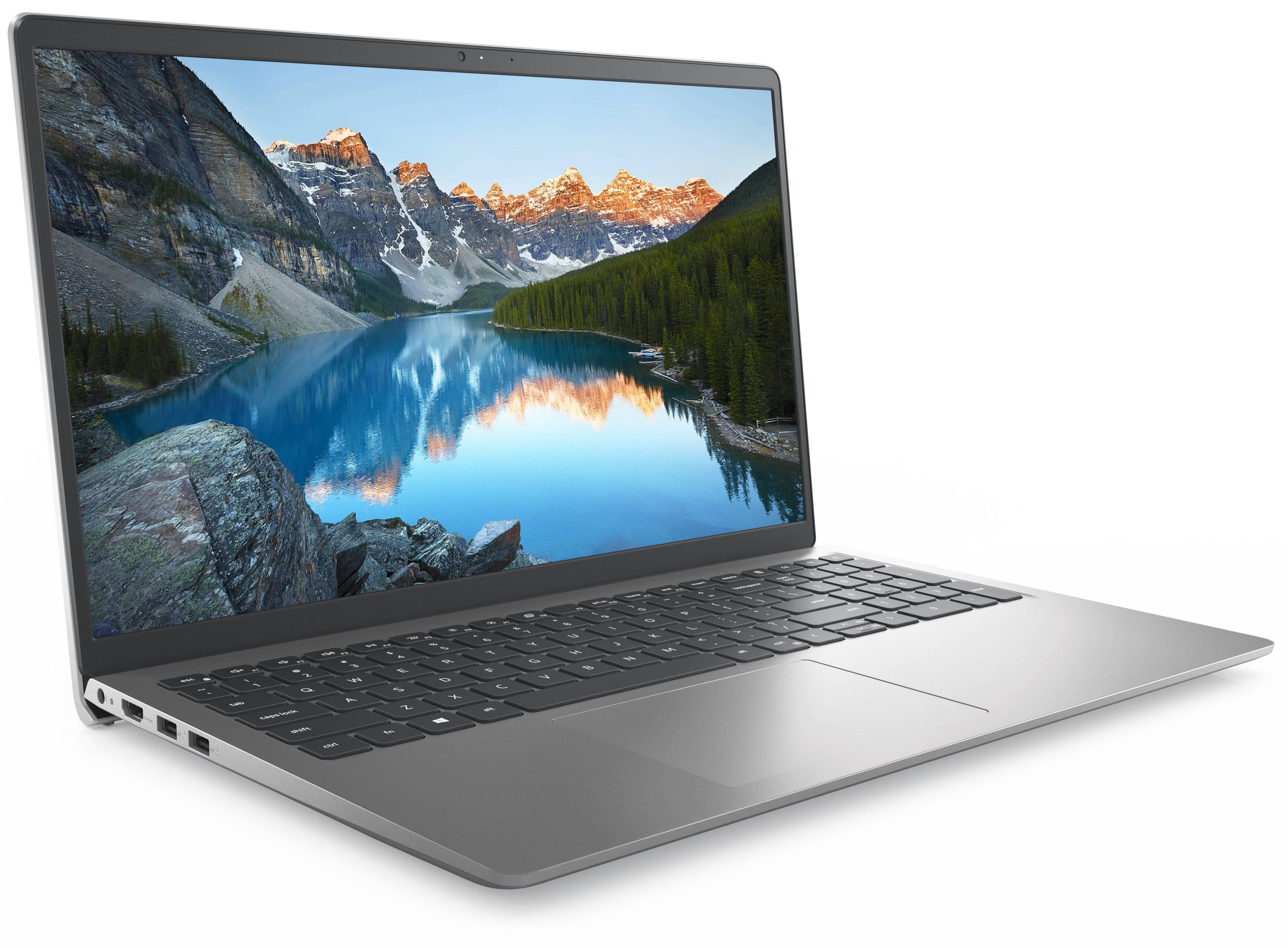
The Inspiron 15 3511 has a clean, simple design with a matte finish that does not show fingerprints easily. The body is mainly plastic, which keeps the price low, but it feels solid in daily use and the hinge holds the screen steadily at any angle. The narrow bezels around the display make the laptop look more modern than older 15-inch models.
At around 1.7–1.8 kg it is not an ultralight laptop, but it is comfortable to carry in a backpack to college or the office a few times a week. Because it is a 15.6-inch machine, it also has a full-size keyboard with a separate number pad – something you do not get on most 14-inch laptops.
Every refurbished Inspiron 15 3511 from amrkart is cleaned and graded. A Grade A unit may show very light signs of previous use, such as faint marks on the lid or base, but nothing that affects how it works. The grade is always shown on the product page, so you know what to expect before it arrives.
Display: a big 15.6-inch Full HD screen
The display is one of the main reasons people choose this laptop. The 15.6-inch panel runs at Full HD (1920 × 1080) resolution, so text is sharp and you can comfortably place two windows side by side – for example, a YouTube lecture on one side and your notes on the other.
The anti-glare coating reduces reflections from tube lights and windows, which helps during long study or office sessions. The panel is a WVA (wide viewing angle) type, so colours and brightness stay consistent when you look at it from a slight angle. It is best suited to indoor use; in very bright sunlight, like most budget laptops, it can be harder to read.
For movies, online classes, documents and spreadsheets, the screen size is a clear advantage over 14-inch laptops at the same price. If you plan to use the laptop at a desk most of the time, you can also connect a second monitor through the HDMI port.
Performance: what the 11th Gen Core i5 can do
The heart of this laptop is the Intel Core i5-1135G7, part of Intel’s 11th Gen “Tiger Lake” family. It has 4 cores and 8 threads and can boost up to 4.2 GHz. Compared with older 8th Gen Core i5 chips found in many refurbished laptops, the 11th Gen processor feels noticeably quicker in everyday tasks and has a much stronger built-in graphics engine.
Everyday use and multitasking
Opening apps, switching between browser tabs, joining Google Meet or Zoom calls, and working in Microsoft Office are smooth. With 8GB RAM, you can comfortably run a browser with 10–15 tabs, Word or Excel, and a video call at the same time. If you regularly keep 25+ tabs open or run heavier software, upgrading to 16GB RAM makes a clear difference.
Office, Tally and accounting work
Tally Prime, Busy, Marg, GST utilities and large Excel sheets run quickly on this laptop. The full numeric keypad makes data entry faster and more accurate, which is why many accountants and shop owners prefer 15.6-inch laptops.
Coding and learning
For students learning Python, Java, C++, web development (HTML, CSS, JavaScript, React) or SQL, the Core i5-1135G7 has more than enough power. VS Code, IntelliJ Community, Jupyter notebooks and local web servers run well. For Android Studio, Docker or virtual machines, we recommend upgrading to 16GB RAM.
Photo and video editing
Light photo editing in Canva, Photoshop or Lightroom is comfortable, and you can edit simple 1080p videos for YouTube or Instagram in apps like Clipchamp, CapCut or DaVinci Resolve. Long 4K projects will be slow – this is an everyday laptop, not an editing workstation.
Graphics: Iris Xe and why dual-channel RAM matters
The Core i5-1135G7 includes Intel Iris Xe graphics, which is much faster than the older Intel UHD graphics in 8th and 10th Gen laptops. There is one important detail many sellers do not explain: Iris Xe only works at full speed when the laptop has two memory sticks installed (dual-channel). With a single memory stick, Windows shows the graphics as “Intel UHD Graphics” and performance is lower.
For office work, studies and browsing, this makes little difference. But if you plan to do light photo or video editing, or play casual games, ask for a dual-channel setup (for example 2 × 4GB or 2 × 8GB). When you choose a RAM upgrade on amrkart, we install the memory in dual-channel wherever possible.
With Iris Xe, popular esports titles and older games can be played at low settings, and the laptop can drive an external Full HD monitor easily. It is not designed for modern AAA games.
RAM and storage: upgrade-friendly
One of the biggest advantages of the Inspiron 15 3511 over many thin laptops is that it is upgradeable:
- RAM: two DDR4 slots, upgradeable to 16GB, which is the maximum Dell lists for this model.
- Storage: an M.2 NVMe SSD slot. You can choose 512GB or 1TB when ordering if you store lots of photos, videos or software.
Our recommendation:
- 8GB RAM + 256GB SSD – students, browsing, online classes and basic office work.
- 16GB RAM + 512GB SSD – coding, heavy multitasking, Tally with large data, photo editing and long-term use.
Because the SSD is solid-state, the laptop boots in seconds and apps open quickly – much faster than older laptops with hard disks.
Keyboard and touchpad
The keyboard is full-size with a dedicated numeric keypad, good key spacing and comfortable travel for long typing sessions. Most Inspiron 15 3511 units do not have a backlit keyboard, so if you often type in the dark, keep that in mind or use a small desk lamp.
The touchpad is a good size, smooth and supports Windows gestures such as two-finger scrolling and three-finger app switching. For long Excel sessions, many users still prefer an external mouse, which connects easily through USB or Bluetooth.
Ports and connectivity
Unlike many slim laptops that offer only one or two USB-C ports, the Inspiron 15 3511 includes the ports most people actually use, so you rarely need adapters:
- HDMI – connect a monitor, TV or projector for classes and presentations.
- USB Type-A ports – for pen drives, printers, a mouse or an external hard disk.
- SD card reader – useful for photographers and phone memory cards.
- Headphone and microphone jack – for wired earphones during calls.
- Ethernet (RJ-45) on many units – for stable wired internet in offices.
Wireless connectivity includes Wi-Fi 5 (802.11ac) and Bluetooth 5.0, which is fast enough for home broadband, video calls and wireless earbuds. The built-in 720p webcam is fine for online classes and meetings.
Battery life: what to realistically expect
The Inspiron 15 3511 has a 41Wh, 3-cell battery. When the laptop was new, light use could stretch to several hours. On a refurbished laptop, the battery has been used before, so capacity is naturally lower than when it was new.
For a healthy refurbished unit, plan on roughly 3 to 5 hours of light use – browsing, documents and online classes – depending on screen brightness and battery health. Video calls and heavy multitasking use more power. This is a laptop that works best when you can plug in during the day, such as at a desk, in a classroom with charging points, or at home.
At amrkart, every battery is tested before dispatch. Batteries that do not meet our standard are replaced. The battery and charger are covered by our warranty for 6 months, and the laptop itself for 12 months – see our warranty policy for details.
Tips to make the battery last longer
- Use Windows’ Battery Saver mode when you are away from a charger.
- Keep screen brightness at 50–70% indoors.
- Close apps and browser tabs you are not using.
- Avoid keeping the laptop at 100% charge on a hot surface for long periods.
Windows 11 and software
Because it uses an 11th Gen Intel processor, the Inspiron 15 3511 fully meets Microsoft’s requirements for Windows 11, so it will keep receiving Windows security updates. Every amrkart unit ships with a properly installed and activated copy of Windows, fully updated, with drivers installed and no unwanted software. You can install Microsoft Office, Google Chrome, Tally, Zoom and all your usual apps as normal.
Why buy the Inspiron 15 3511 refurbished?
A refurbished laptop is not the same as a random second-hand laptop. Here is what “certified refurbished” means at amrkart:
- 7-step quality check – processor, memory, storage, display, keyboard and touchpad, battery, and ports and Wi-Fi are all tested.
- Secure data wipe – the previous owner’s data is completely erased.
- Fresh Windows setup – clean, activated and updated.
- Cleaning and honest grading – every laptop is cleaned and given a clear cosmetic grade.
- Warranty and returns – a 12-month warranty and a 7-day return for any reason (return policy).
- Free, insured delivery across India in tamper-proof packaging.
You get the same processor, screen and keyboard as a new unit, for a much lower price – and one less laptop ends up as e-waste.
Dell Inspiron 15 3511 vs other laptops at a similar price
| Laptop | Processor | Screen | Best for |
|---|---|---|---|
| Dell Inspiron 15 3511 (refurbished) | Core i5 11th Gen | 15.6″ FHD | Big screen, number pad, students and office |
| Dell Vostro 3400 (refurbished) | Core i5 11th Gen | 14″ | Same chip in a smaller, lighter body |
| ASUS VivoBook 15 X515 (refurbished) | Core i5 11th Gen | 15.6″ FHD | Similar alternative with a slim design |
| Dell Latitude 5420 (refurbished) | Core i5 11th Gen | 14″ | Business build, backlit keyboard, Thunderbolt 4 – costs more |
| New budget laptop (same price) | Often Celeron / Core i3 | 14–15.6″, often HD | Fresh battery, but much less performance |
Inspiron 15 3511 vs Vostro 3400: both use the same 11th Gen Core i5. Choose the Inspiron for a larger screen and number pad, or the Vostro if portability matters more.
Inspiron 15 3511 vs Latitude 5420: the Latitude is a premium business laptop with a stronger build, backlit keyboard and Thunderbolt 4, but it usually costs more and has a smaller 14-inch screen. If you do not need those extras, the Inspiron gives better value.
Inspiron 15 3511 vs a new budget laptop: at a similar price, many new laptops use Celeron or entry-level processors with less RAM and sometimes an HD screen. The refurbished Inspiron is significantly faster and more useful for real work; the new laptop’s main advantage is a brand-new battery.
Pros and cons
- Fast 11th Gen Core i5 with Iris Xe graphics
- Large 15.6″ Full HD anti-glare screen
- Full keyboard with number pad
- Upgradeable RAM (to 16GB) and SSD
- Useful ports: HDMI, USB-A, SD card
- Windows 11 supported
- Excellent value as a refurbished laptop
- Not lightweight (about 1.7–1.8 kg)
- Keyboard not backlit on most units
- Average battery life on a refurbished unit
- Mostly plastic build
- Not suited to heavy gaming or 4K editing
Which configuration should you choose?
On amrkart you can choose upgrades directly on the product page before you order. Here is a simple way to decide:
- School and college students: 8GB RAM with a 256GB SSD is enough for classes, assignments, presentations and entertainment. Add 512GB storage if you download many videos or study materials.
- Office and work from home: 8GB is fine for email, documents and calls. Choose 16GB if you keep many tabs, Excel files and meeting apps open at the same time every day.
- Accountants and business owners: 16GB RAM and a 512GB SSD keep Tally, billing software and large spreadsheets fast for years, especially when company data grows.
- Programmers and data learners: 16GB RAM and 512GB SSD give room for IDEs, local servers, databases and Python libraries.
If you are unsure, send us a message on WhatsApp with what you will use the laptop for, and our team will suggest the right setup – there is no pressure to buy upgrades you do not need.
How to look after your refurbished laptop
- Use the original or a good-quality 65W charger to protect the battery and motherboard.
- Keep the vents clear – avoid using the laptop on a bed or pillow for long periods so it can stay cool.
- Install Windows updates regularly for security and stability.
- Back up important files to Google Drive, OneDrive or an external drive.
- Clean the screen and keyboard with a soft, dry microfibre cloth; never spray liquid directly on the laptop.
- Carry it in a padded laptop bag to protect the hinge and screen while travelling.
Checklist before you buy a refurbished Inspiron 15 3511
- Confirm the processor is the Core i5-1135G7 (11th Gen), not an older model.
- Check RAM and whether it is dual-channel if you need Iris Xe graphics.
- Confirm the SSD size and that it is an SSD, not a hard disk.
- Ask about battery health and whether the battery has been tested.
- Check the cosmetic grade and photos of the actual condition.
- Make sure Windows is genuine and activated.
- Confirm a working 65W charger is included.
- Get the warranty and return policy in writing.
Every amrkart Inspiron 15 3511 ticks all of these boxes before it is shipped.
Frequently asked questions
Is the Dell Inspiron 15 3511 good for students?
Yes. Its 11th Gen Core i5, large Full HD screen and full keyboard make it a great laptop for online classes, assignments, coding practice and exam preparation. 8GB RAM is enough for most students; choose 16GB for coding or heavy multitasking.
Can I upgrade the RAM in the Dell Inspiron 15 3511?
Yes. It has two DDR4 memory slots and supports up to 16GB RAM. You can choose a RAM upgrade when ordering on amrkart, and we install it for you.
Does the Dell Inspiron 15 3511 support Windows 11?
Yes. The 11th Gen Intel Core i5 meets Microsoft’s Windows 11 requirements, and every amrkart unit ships with genuine, activated Windows.
Is the Dell Inspiron 15 3511 keyboard backlit?
Most Inspiron 15 3511 units do not have a backlit keyboard. If backlighting is important to you, ask us on WhatsApp about the exact unit before ordering.
How long does the battery last on a refurbished Inspiron 15 3511?
Expect roughly 3 to 5 hours of light use on a healthy refurbished unit, depending on brightness and workload. Every battery is tested before dispatch and covered by our warranty.
Is it safe to buy a refurbished Dell laptop online?
Yes, if the seller tests every laptop, wipes data, installs genuine Windows and gives a written warranty and return policy. amrkart offers a 12-month warranty, a 7-day return for any reason, free delivery and secure payment through Razorpay.
Final verdict: should you buy the refurbished Dell Inspiron 15 3511?
If you want a large-screen, upgradeable Windows laptop with a modern 11th Gen Core i5 at a sensible price, the refurbished Dell Inspiron 15 3511 is an easy recommendation. It handles office work, online learning, Tally, coding practice and entertainment comfortably, and its RAM and SSD upgrades let it grow with your needs.
It is not the lightest laptop and its battery life is average, so it suits people who work mainly at a desk, in a classroom or at home. For that kind of use, it delivers far more value than a new budget laptop at the same price – especially when it comes tested, graded and covered by a 12-month warranty from amrkart.
Core i5 11th Gen · 8GB RAM · 256GB SSD · 15.6″ FHD · 12-month warranty · Free delivery
View price and buyAsk on WhatsApp